Book a demo

AI that works
as your teammate.

Let Claude Code turn your ideas into finished work. No coding required. A secure, shared workspace for your team and AI.

Book a demo Works with your existing Claude plan.
The Team plan is enough to start.
Illustration of three people working around a shared drive connected to the cloud Team shared drive Claude Code Isolated environment
For non-developers

Claude Code,
for teams that don’t write code.

Built for strategy and planning, sales, marketing, and R&D

AI is still just a tool

It handles a few tasks, but the way you work hasn’t changed.

Best practices stay on one laptop

Great prompts and workflows live with one person, not the team.

AI can’t access your team’s files

Everyone re-uploads the same shared documents and decisions, one at a time.

Why Claude Code

Chat answers questions.
Claude Code does the work.

Chat AI gives you an answer in the conversation. Claude Code reads your documents and data and delivers completed work. Your work and decisions are saved, so the next project
builds on them.

Chat AI

Helps with the task
in front of you.

Example: ask for a customer proposal deck

You get an outline and a draft in the chat.

  • Answers stay in the conversation
  • Turning them into a deck is on you
vs
Claude Code

Takes you from a blank page
to completed work.

Example: ask for a customer proposal deck

It reads your past proposals and account notes, then delivers the deck, ready to use. The next one follows the same playbook.

  • Reads your documents and data, delivers completed work
  • Decisions are saved and carry over to the next project

Claude Code for your whole team, securely.
That’s Zipteam AI.

Service

What Zipteam AI adds
to the Claude you already have.

Keep your Claude account and plan. Open a browser, and your team’s files and Claude Code are in one shared workspace. Nothing to install or configure.

Your company / Identity

Sign in from a browser
with your work account

Log in with your Microsoft 365 or Google Workspace account. IT sets up SSO once.

SSO

Macnica / Zipteam AI

Managed Claude Code environment
for your team

Claude Code for the whole team

Shared playbooks and shared files mean everyone’s Claude Code works from the same context.

Runs in the cloud, not on laptops

Claude Code runs only in an isolated cloud environment dedicated to your company.

Your company / Claude plan

Sign in with your
Claude account

Same plan, same models. The Team plan is enough to start.

Anthropic

From individual wins
to team-wide results.

Screen

What you see in the browser

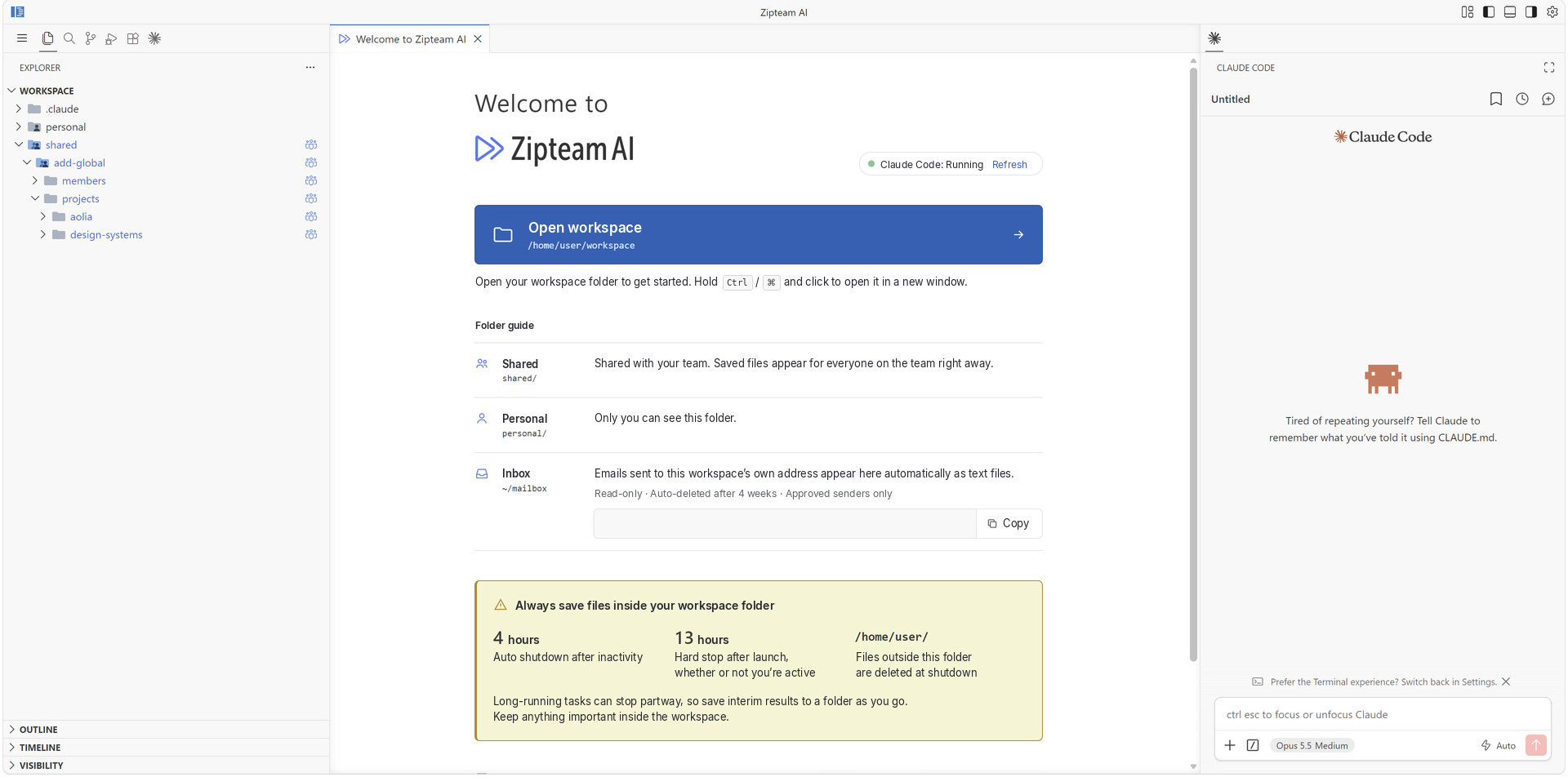
Left to right: your files, the page you’re working on, and Claude Code. All on one screen.

Zipteam AI in the browser: file explorer on the left, the workspace page in the center, and the Claude Code panel on the right
① Files
② View and edit
③ Ask Claude Code

Built-in roles

Two teammates included
from day one.

Illustration of a person carrying a calendar

PMO

Keeps projects moving. It interviews you to build the project charter, then organizes requirements, flags delays, surfaces risks, and records decisions.

Illustration of two people debating at a whiteboard

CxO Advisory Board

Seven executive perspectives (CSO, CPO, CTO, CMO, CRO, CFO, CHRO) that challenge your thinking instead of agreeing with it.

Concerns

Four questions we hear
before every rollout.

“Isn’t this a developer tool?”
→
Open a browser and start typing. No commands, no jargon.
“Can I get started on my own?”
→
Two roles are built in. A PMO to run projects and a CxO Advisory Board to think with. Just start a conversation.
“Can my team share files?”
→
Yes. Save a file or playbook once, and the whole team can use it.
“Will IT sign off?”
→
We’re a managed service. We answer your IT security questionnaire ourselves.

Use cases

What teams actually hand off,
by department.

Planning: two people discussing ideas across a desk
Strategy sounding board

Lays out your options when the plan’s assumptions change.

Internal updates

A 10-minute business update deck, from pulling existing materials together to the outline to the slides.

Variance analysis

Explains why expenses went up, down to department and headcount, in one pass.

Staffing plans

Project assignment proposals, starting with who’s available.

Marketing: a person calling out through a megaphone
Meeting notes on autopilot

Drop in a transcript and it’s formatted by meeting type. Runs automatically.

Social posts and visuals

Three post variants per channel. Banners, thumbnails, and favicons included.

Budget and web dashboard

Budget burn and web metrics in a single HTML page.

Webinar promotion copy

Newsletter copy, titles, and abstracts refined as often as needed for different audiences.

Sales: two people shaking hands
Consolidated proposals

Combines multiple decks into one branded master deck.

Key account history

Call transcripts organized by speaker and archived. Then a new deck for one specific buyer.

Customer case study kit

Pitch, process flow, interview sheet, and talk track for publishing a key account’s story, as one package.

KPIs by role

Tracks each person’s KPIs, with targets that fit their role.

R&D: a person looking through a microscope
Technology scans

Reads standards and papers, then summarizes what matters and what it means for your products.

Test data summaries

Multiple measurement runs in one table and one chart.

Design review records

Turns review notes into a decision log: what was decided and why.

Roadmap inventory

Lists every development theme as input for reprioritizing.

Security

Six questions
IT asks first

01Your data isn’t used to train AI models

Zipteam AI runs on your company’s Claude plan. Under Anthropic’s commercial terms, your files and conversations aren’t used to train its models unless you choose to share them. Macnica doesn’t use your data for training either.

02Nothing installed, fully isolated by company and team

Each user works in a dedicated cloud environment. Nothing is installed on laptops. Each company and each team is fully separated, so no one can see data outside their own workspace. All outbound traffic exits through a single fixed IP.

03Data stored in Google Cloud

Zipteam AI runs on Google Cloud infrastructure.

04Our access is limited to three cases

Monitoring, incident investigation, and support you request. Our terms spell this out.

05Tamper-proof audit logs

Logs can’t be altered after the fact. For audits, we export your company’s records only.

06Covered by Macnica’s ISO 27001

Zipteam AI operations are within the scope of Macnica’s ISO 27001 (ISMS) certification.

A secure, shared workspace
for your team and AI.

Ecosystem

Backed by Macnica’s
technology ecosystem.

Zipteam AI is a managed Claude Code environment from Macnica, a global technology company headquartered in Yokohama, Japan.

Managed Claude Code environment
for your team

Macnica is a Certified Partner in the Claude Partner Network.

We’re running a research project with Claremont Graduate University’s Drucker School and CISAT to measure how well an AI chief of staff works.

FAQ

Frequently asked questions

Where do I start?
Book a 30-minute demo. Tell us about your work and what you want AI to change, and we’ll show you the product live. No prep needed. IT is welcome to join.
How is this different from the AI we already use?
Claude Code in Zipteam AI takes plans, proposals, and analysis from a blank page to completed work, using your team’s files and playbooks. You decide what it uses, and you can review and change everything. Finished work stays in the shared workspace for the next project. Many teams keep their current tools for everyday tasks and use Zipteam AI for planning and proposals.
What’s the difference between Claude and Claude Code?
Claude answers in a conversation. Claude Code is Claude that reads and writes files. It delivers plans and analysis as files and saves decisions for the next project. In Zipteam AI, you use Claude Code from a browser. That’s it.
What do I need to get started?
A browser, a work account, and a Claude subscription. There’s nothing to install. Sign in with Microsoft 365 or Google Workspace, and your IT team sets up single sign-on (SSO) once. The Claude Team plan is enough to start.
Can I use it without a Claude subscription?
No. Zipteam AI requires a Claude subscription. The Team plan is enough to start.
How do I add documents and data?
Drag and drop files into the file list on the left, or right-click and choose Upload. Claude Code can read anything you add. Text, PDF, Word, and PowerPoint are supported. Text and PDF are read most accurately. To save finished files, use Download in the same menu.
Can my whole team use it?
Yes. Each team has a shared drive. Save a file, and teammates see it right away. Personal drafts go in a private folder. A good approach can be saved as a playbook for the whole team.
What does it cost?
We’ll walk you through pricing on the demo call, based on your team size and how you plan to use it.
What happens to my data if I cancel?
Your account and data are deleted promptly after the contract ends. Deleted data can’t be recovered, so download anything you need before the end date.

Contact

Ready to see it?
Book a demo.